I am sure I am overlooking something simple but I cannot seem to find how to adjust the thumb button angles. The way it is setup now I cannot push down on the thumbstick without clicking the lower button.

You are using an out of date browser. It may not display this or other websites correctly.
You should upgrade or use an alternative browser.
Adjust angle of thumb buttons? Lower thumb button gets in the way of the thumbstick
- Thread starter Muad'Dib
- Start date
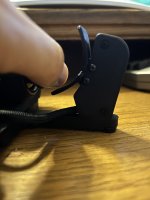
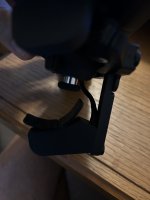
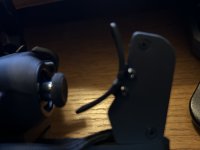
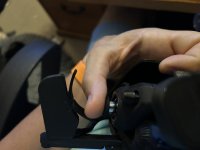

thumbstick button angles can't be changed without modifying it. just distance can be changedI am sure I am overlooking something simple but I cannot seem to find how to adjust the thumb button angles. The way it is setup now I cannot push down on the thumbstick without clicking the lower button.
This doesn’t solve the problem. I just received mine and have the same problem. There’s no way to position it far enough away where my thumb doesn’t click the lower button unless I completely turn the button so it’s unusable. It’s also odd how far away the upper button is vs the lower button but mine is exactly like this photo. I’ve seen videos where it looks different.thumbstick button angles can't be changed without modifying it. just distance can be changed

Adjust the thumb tower as far from the thumbstick as possible and then loosen the marked screw in the attached screenshot and adjust the angle of the thumbstick. You can also raise the thumbstick higher.This doesn’t solve the problem. I just received mine and have the same problem. There’s no way to position it far enough away where my thumb doesn’t click the lower button unless I completely turn the button so it’s unusable. It’s also odd how far away the upper button is vs the lower button but mine is exactly like this photo. I’ve seen videos where it looks different.
That doesn’t help. Have already done that. By adjusting the thumb tower to max distance the thumb still touches the lower button when you press down on the joystick. Yes, I have already shifted the joystick as you describe. Something seems wrong. I’m wondering if the piece the thumb tower is connected to is too short? But it’s also strange how close the lower button on the tower is compared to the upper button.Adjust the thumb tower as far from the thumbstick as possible and then loosen the marked screw in the attached screenshot and adjust the angle of the thumbstick. You can also raise the thumbstick higher.
View attachment 4323
Please attach a picture showing how your thumbstick is currently adjusted.That doesn’t help. Have already done that. By adjusting the thumb tower to max distance the thumb still touches the lower button when you press down on the joystick. Yes, I have already shifted the joystick as you describe. Something seems wrong. I’m wondering if the piece the thumb tower is connected to is too short? But it’s also strange how close the lower button on the tower is compared to the upper button.